

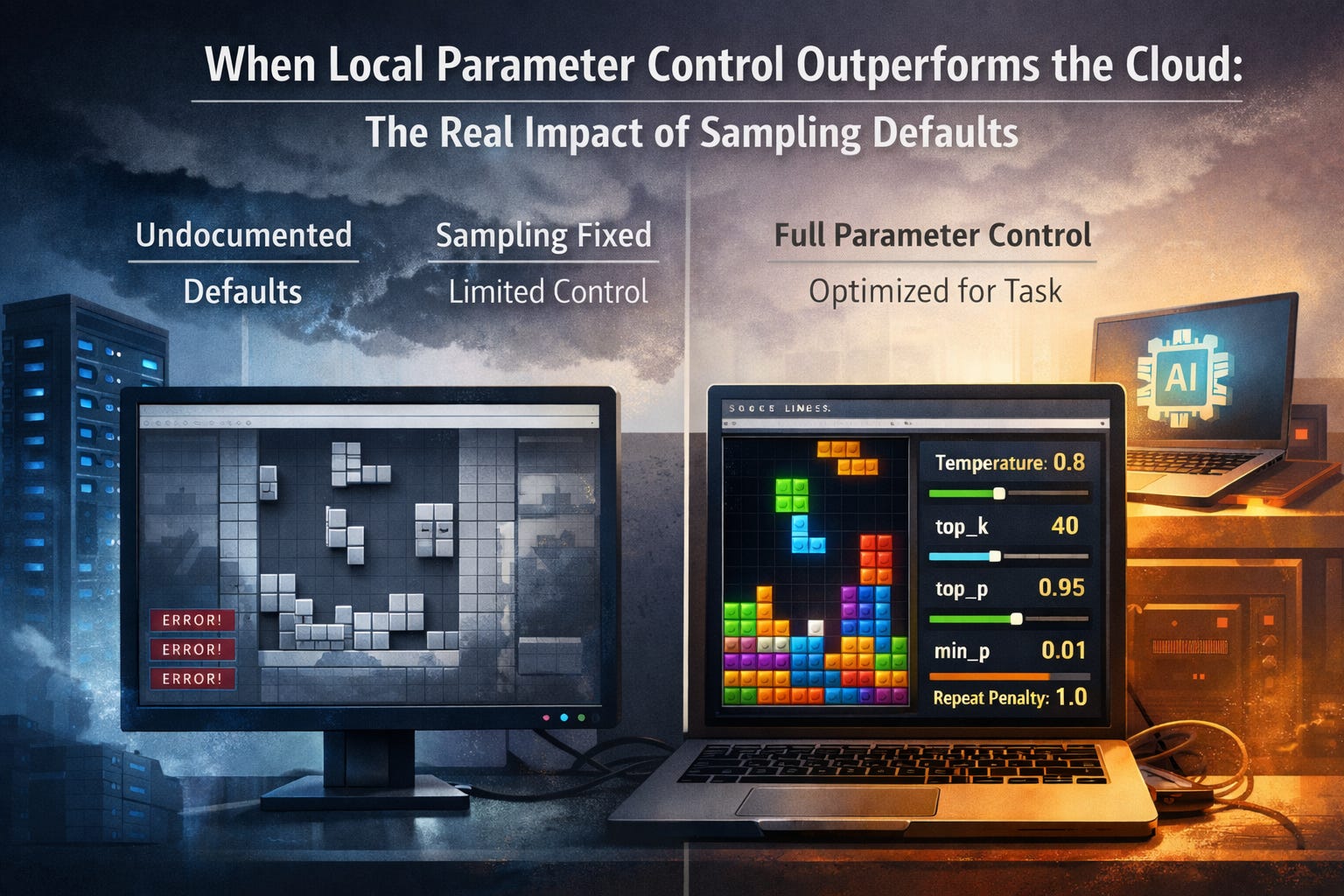
Imagine the following.
You’re a developer. You’ve integrated ZhipuAI’s GLM-4.5-Air through your cloud provider’s API. The specs are solid: Q8 quantization, near-lossless precision, benchmark-proven performance. You’ve set up your API keys, configured billing, written your integration code. Everything is ready.
You send your first real request: “Generate a complete Tetris game in HTML.”
The model responds. The code compiles. The structure looks reasonable. You open it in a browser.
Nothing works. Pieces don’t fall. Rotation breaks. Collision detection fails.
You refine your prompt. Add more detail. Include specific instructions about game mechanics. Iteration 5. The output is slightly different but still broken.
You add code examples. Show the model what good Tetris code looks like. Iteration 12. Still broken.
You break down the task into smaller pieces. Generate the grid first. Then the piece logic. Then collision detection separately. Iteration 23. The pieces still don’t fall.
You study prompt engineering guides. Apply chain-of-thought techniques. Add step-by-step reasoning. Iteration 38. The game remains non-functional.
Iteration 50. Iteration 67. Iteration 83.
You start questioning yourself. Am I bad at prompt engineering? Do I not understand this model? Is the task too complex? Should I switch to a different model entirely?
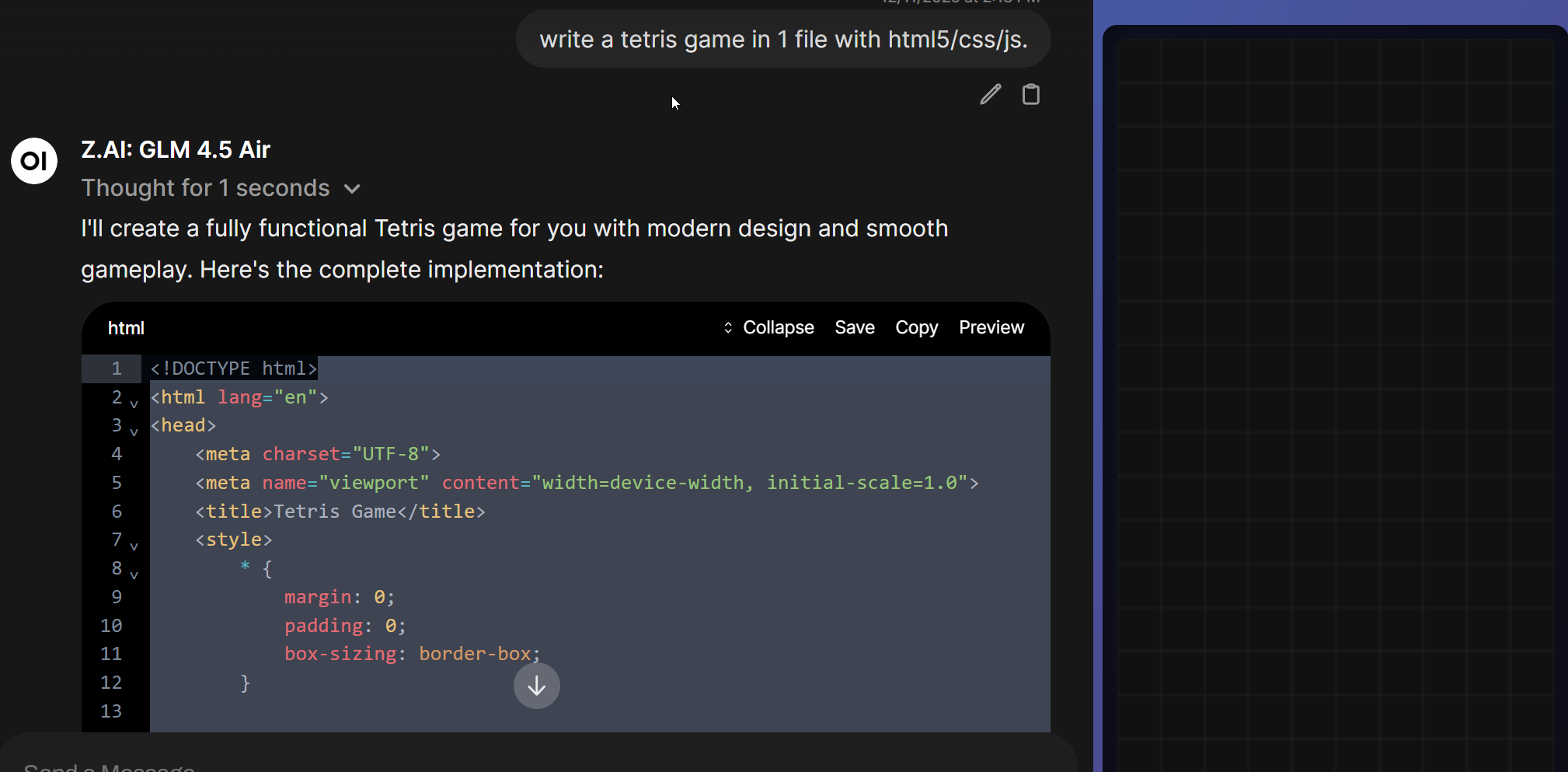
You’re exhausted. You’ve spent hours on this. The model has Q8 quantization – near-perfect precision. It should work. But it doesn’t.
Then you try something out of desperation.
You download the same model – GLM-4.5-Air – and run it locally through LMStudio. But you only have limited hardware, so you use aggressive Q2 quantization. You’re sacrificing 75% of the weight precision. This should make things worse, not better.
But you configure the sampling parameters manually:
temperature: 0.8
top_k: 40
top_p: 0.95
min_p: 0.01
repeat_penalty: 1.0
Same prompt. Same model. Drastically lower precision.
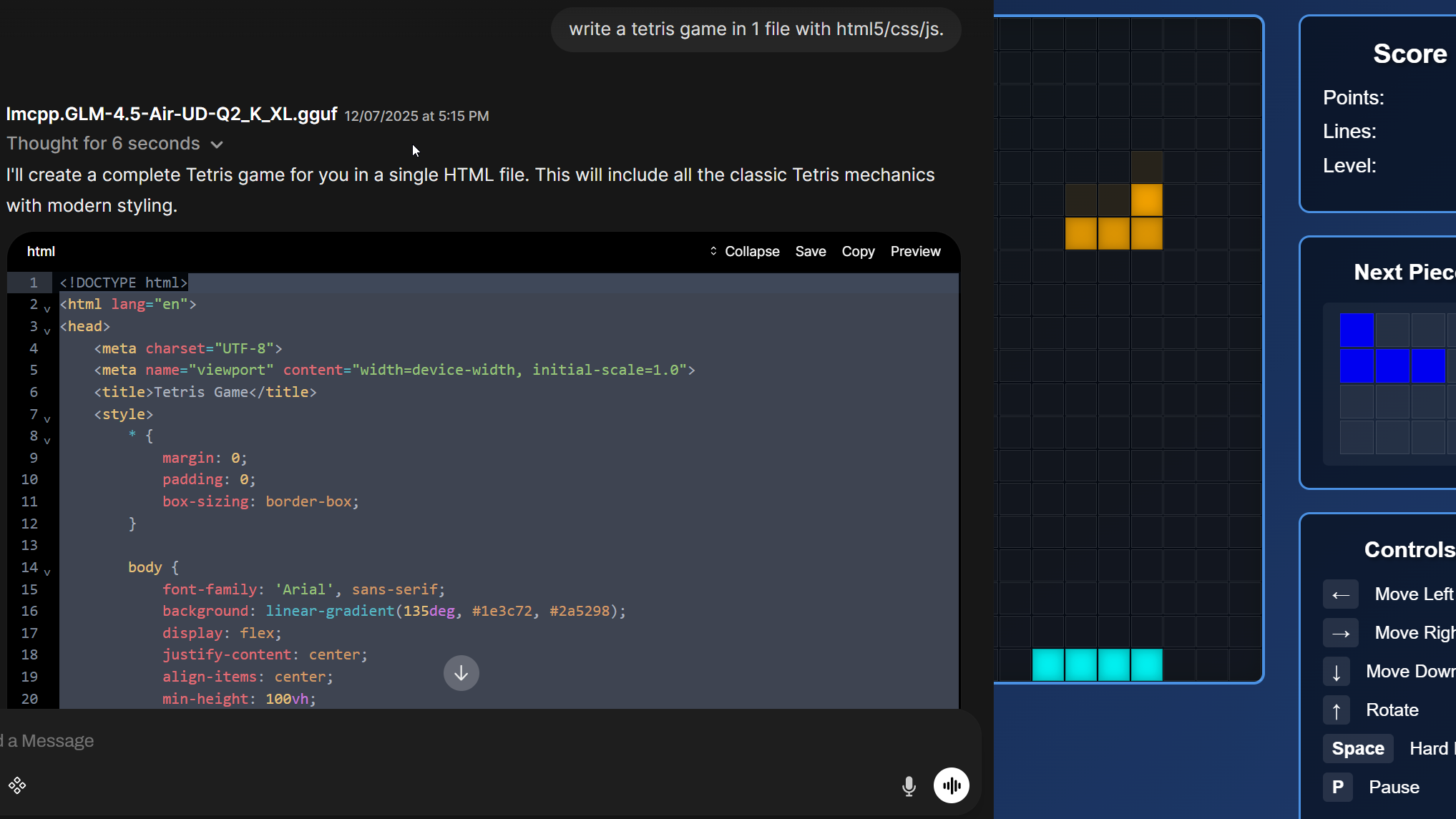
You hit enter.
The code works.
Clean, functional Tetris. Pieces fall correctly. Rotation is smooth. Collision detection is precise. The game is playable.
Q2 quantization with optimal parameters just outperformed Q8 with cloud defaults.
You stare at your screen. What the fuck just happened?
The Evidence
Let’s look at what actually differed between these two outputs.
Cloud output (Q8, provider defaults):
The game initializes but fails at runtime:
gameLoop()executes but pieces remain frozen – no descentRotation matrix exists but boundary validation is broken
Variable naming is chaotic (
dropCountervslastDropwith unclear distinction)Score system triggers but line-clearing never executes
The code looks correct on inspection but core mechanics are dead
Local output (Q2, custom parameters):
Functional game with clean architecture:
Clear separation between state management and rendering
Collision detection with proper bounds checking
Consistent naming conventions throughout
Working line-clear logic integrated with scoring
Professional-grade code structure
The model with 4x lower weight precision produced objectively superior code.
The difference wasn’t the quantization. It was the sampling parameters.
Why This Happens: The Parameter Problem
Quantization affects model weights statically. You compress them once, information loss happens at load time, the degradation is predictable.
Sampling parameters control inference dynamically. They determine how the model selects tokens from probability distributions at every single generation step. Misconfigured parameters degrade output quality in real-time, every token, regardless of how precise your weights are.
The mechanisms:
temperature controls distribution entropy. Set it wrong and you get either chaotic sampling from implausible tokens or pathological repetition and mode collapse.
top_p (nucleus sampling) accumulates probability mass until a threshold. Standard parameter, but the optimal value depends heavily on the specific model and task.
top_k limits the candidate pool to the k most probable tokens. Critical for controlling output coherence without over-constraining creativity.
min_p sets adaptive probability thresholds. Without this, models sample from tokens that shouldn’t be candidates – just because they happened to make it past the top_p cutoff.
repeat_penalty prevents degenerative loops. Calibrate it wrong and you get endless repetition or unnatural avoidance of necessary patterns (like variable names that need to appear multiple times in code).
For code generation specifically:
The right parameter configuration is task- and model-specific. For GLM-4.5-Air on code generation, the sweet spot turned out to be:
temperature: 0.8(lower than typical chat defaults of 1.0, more focused sampling)top_k: 40(moderate constraint, prevents noise without over-limiting)top_p: 0.95(high nucleus sampling, allows broader token consideration)min_p: 0.01(low but non-zero, filters obvious garbage tokens)repeat_penalty: 1.0(neutral, no artificial penalty)
Cloud providers use one-size-fits-all defaults. Those defaults might work acceptably for general chat but fail catastrophically for structured output like code.
The Three-Step Diagnostic
Here’s the critical issue: You need to diagnose whether you even have control over these parameters.
Step 1: What Are The Default Settings?
Most providers don’t document their sampling parameter defaults. You’re running blind – you don’t know what temperature, top_k, min_p, or repeat_penalty values are actually being used.
Action: Check provider documentation. Look for:
Parameter default values
Model-specific configuration notes
Any mention of sampling strategy
If defaults aren’t documented – that’s a red flag. You’re operating in a black box.
Step 2: What Can You Actually Configure?
Provider API parameter exposure varies dramatically:
Full control:
temperature,top_p,top_k,min_p,repeat_penaltyall configurableExamples: Together AI, Fireworks AI
Partial control:
temperaturetypically exposed (0.0–2.0)Subset of other parameters may be available (varies by provider)
top_k,min_p,repeat_penaltyoften not exposed or silently ignored
Minimal control:
Only
temperatureconfigurableEverything else hard-coded to provider defaults
Often no documentation of what those defaults are
The distribution of these categories varies – check your specific provider’s documentation.
Action: Test parameter overrides. Send API requests with explicit parameter values. Check if changing them actually affects output. Some providers accept the parameters in the API call but silently ignore them.
From OpenRouter’s documentation:
“If the chosen model doesn’t support a request parameter (such as logit_bias in non-OpenAI models, or top_k for OpenAI), then the parameter is ignored.”
No error. No warning. Your parameter gets discarded. The model runs with provider defaults. You never find out.
Step 3: Find Optimal Parameters For Your Use Case
If you have parameter control: Don’t assume defaults are optimal.
Generic conversational defaults are calibrated for chat interactions. They’re often suboptimal for:
Code generation
Structured output (JSON, XML)
Long-form writing with specific style requirements
Translation tasks
Technical documentation
Action: Run empirical tests. For the specific model and task:
Test with provider defaults (if documented)
Test with task-specific parameter sets
Measure output quality systematically
This isn’t universal – different models and tasks need different configurations. But the principle holds: Defaults are rarely optimal for specialized tasks.
The Three Routes To Cloud LLMs
Before diving into the meta-provider complexity, understand that there are fundamentally three ways to access LLMs in the cloud:
Route A: Reference Provider (Direct API)
Access the model directly from the organization that created it – e.g., ZhipuAI’s API for GLM models, Anthropic for Claude, OpenAI for GPT.
Advantages:
Often better parameter defaults (tuned by the model creators)
Usually more parameter control
Direct relationship with the source
Disadvantages:
Data sovereignty concerns (e.g., data flowing to China for Chinese models)
Vendor lock-in
May require separate billing for each provider
Route B: Third-Party Cloud Providers
Providers like Together AI, Fireworks AI, Hyperbolic, DeepInfra host models themselves.
Advantages:
Often better parameter exposure than aggregators
Clearer infrastructure control
Sometimes better regional data policies
Disadvantages:
Implementation quality varies
Parameter defaults may differ from reference provider
Still requires checking what’s actually configurable
Route C: Meta-Providers (Aggregators)
Services like OpenRouter route your requests to multiple backend providers dynamically.
Advantages:
Single API for many models
Automatic fallback when providers are down
Cost optimization through dynamic routing
Disadvantages:
Non-deterministic backend selection
Parameter support varies by backend
Quality variance depending on which provider handles your request
The critical point: Even with the same model and same quantization, these three routes can produce measurably different outputs due to parameter configurations.
The Meta-Provider Complication
Let’s focus specifically on Route C – meta-providers like OpenRouter – because this is where complexity compounds.
OpenRouter doesn’t host models – it aggregates access to backend providers (Together AI, Hyperbolic, DeepInfra, Fireworks, etc.). When you request a model:
OpenRouter routes to the cheapest/fastest available backend
Each backend may use different parameter defaults
Each backend may support different parameter overrides
You usually don’t know which provider served your request
The same model produces different outputs depending on routing
OpenRouter documents this explicitly:
“Providers running the same model can differ in accuracy due to implementation details in production inference. OpenRouter sees billions of requests monthly, giving us a unique vantage point to observe these differences.”
They’ve analyzed billions of requests and confirmed: Same model, same quantization, different providers → measurably different output quality.
A concrete example from GitHub (Issue #737):
“Qwen2.5 Coder 32B Instruct is served by multiple providers through OpenRouter: DeepInfra (33k context), Hyperbolic (128k context), Fireworks (33k context). Due to dynamic load balancing, users experience variability in model performance.”
Same model. Different backend. Different context windows. Different results.
The good news: OpenRouter allows provider-specific routing and exposes many parameters. You can specify:
{
  “model”: “zhipuai/glm-4-air”,
  “provider”: {
    “order”: [”Together”, “Fireworks”],
    “allow_fallbacks”: false
  },
  “temperature”: 0.8,
  “top_k”: 40,
  “top_p”: 0.95,
  “min_p”: 0.01,
  “repeat_penalty”: 1.0
}
The bad news: Not all providers behind OpenRouter support all parameters. Even when you specify them, individual backends might ignore them.
What You Can Actually Do
If your LLM output is inexplicably bad, run this diagnostic before you blame yourself:
1. Check What Parameters You Can Control
Go through your provider’s API documentation:
Which parameters are documented?
Which can you override?
Are defaults listed anywhere?
If documentation is sparse or missing – that’s a warning sign.
2. Test Parameter Impact
Send identical requests with different parameter values. Verify that changes actually affect output.
Example test:
// Request 1
{”temperature”: 0.5, “top_k”: 20}

// Request 2
{”temperature”: 1.2, “top_k”: 80}
If outputs are suspiciously similar despite dramatic parameter differences – your parameters are being ignored.
3. Test Locally (If Hardware Available)
Download the model via Ollama or LM Studio. Configure parameters explicitly:
temperature: 0.8
top_k: 40
top_p: 0.95
min_p: 0.01
repeat_penalty: 1.0
Run the exact same prompt. If local output is significantly better – even with aggressive quantization like Q4 or Q2 – the problem isn’t you. It’s the cloud configuration.
4. Test Different Access Routes
If local testing isn’t possible: Test the same model through different access routes.
Route A (Reference Provider):
Access the model directly from the creator’s API (if available and acceptable for your data policy)
Often has better parameter defaults
Route B (Third-Party Hosting):
Try providers like Together AI, Fireworks AI, Hyperbolic
Check their parameter documentation
Route C (Meta-Provider):
If using OpenRouter, test with explicit provider selection
Compare results across different backend providers
If quality varies dramatically across routes, you know: The problem isn’t your prompt.
5. Optimize Parameters For Your Task
If you have parameter control: Don’t use defaults blindly.
General guidance from research:
For code generation and structured output, empirical studies suggest:
temperature: 0.1-0.5 (lower = more deterministic)
top_k: 30-50
top_p: 0.3-0.9 (varies by model)
For creative writing:
temperature: 0.7-1.2
top_k: 50-100
top_p: 0.9-0.95
Critical caveat: Optimal parameters vary significantly by model and specific task. Research on code generation has shown wildly different optimal configurations:
GPT-4:
temperature=0.1, top_p=0.9Mistral-Medium:
temperature=0.9, top_p=0.3GLM-4.5-Air:
temperature=0.8, top_p=0.95
These aren’t universal rules – they’re starting points. Test systematically for your specific model and use case.
6. Demand Transparency
If you’re a paying customer getting consistently suboptimal results: Ask.
What sampling parameters are you using?
Are my parameter overrides respected?
Why does quality vary between requests?
Which backend provider served my request?
This isn’t unreasonable. You’re paying for inference quality. You have the right to know what’s happening under the hood.
The Structural Fix
This problem is solvable. But it requires infrastructure providers to change their approach.
What cloud providers should do:
Document default parameters – For every model, every endpoint: What sampling parameters are actually used?
Support parameter overrides – At minimum:
temperature,top_p,top_k,min_p,repeat_penaltyshould be configurableRespect user-specified parameters – If you don’t support a parameter, throw an error. Don’t silently ignore it.
Transparent routing info – If requests can route to different backends: Tell users which provider served them
Model-specific parameter recommendations – Document optimal parameter ranges for common tasks (code, writing, translation)
What the community should do:
Build empirical benchmarks. Not just “Model A vs Model B” but “Model A via Provider X vs Provider Y, with documented parameters.”
Document the exact prompts, sampling settings, provider endpoints. Only transparency creates pressure for better standards.
Share parameter configurations that work. Create task-specific parameter guides. Build collective knowledge about what actually works in production.
Stop Blaming Yourself
When you’ve iterated through 50, 70, 100 prompts and results stay inconsistent – the problem might not be you.
LLM performance is determined by variables you often can’t see or control. Quantization is one part of the equation. Sampling parameters are frequently the more critical factor.
Cloud infrastructure can be a black box. Defaults aren’t documented. Parameters get silently ignored. Identical models produce different outputs depending on backend routing.
Before you question your abilities:
Check what parameters you can actually control
Test if parameter overrides are respected
Try optimal configurations for your specific task
Test locally if possible
Test other providers
Demand transparency
This isn’t prompt engineering failure. This is a structural infrastructure problem where critical configuration details remain opaque to users who are paying for the service.
The solution isn’t just “try harder with your prompts.” The solution is understanding that inference quality depends on invisible parameters – and learning to diagnose, test, and optimize them when you can.
And when you can’t? That’s when you know: It’s not you. It’s the infrastructure.
Practical Resources:
Local testing: Ollama (ollama.ai), LM Studio (lmstudio.ai)
Parameter-transparent providers: Together AI, Fireworks AI, Anthropic (direct)
OpenRouter provider routing: https://openrouter.ai/docs/features/provider-routing
Community parameter sharing: r/LocalLLaMA, HuggingFace forums