


The standard assumption is that LLM training requires serious hardware. That’s true for production use cases. For experimentation - for actually understanding what finetuning does to a model’s behavior - it’s not.
This is a full walkthrough of finetuning a small language model on CPU, from environment setup to a GGUF file you can load in LM Studio. The proof that it works is the dataset: five question-answer pairs of deliberate nonsense. If the model reproduces that nonsense after training, the finetuning wrote into the weights. It did.
Why CPU at All?
GPU training is faster. That’s not negotiable. But “slower” and “impossible” are different things, and the distance between them matters if you’re trying to understand finetuning rather than ship a product.
What actually changes when you adjust learning rate? What does eight training epochs do versus two? How few examples can a 270M-parameter model absorb before it starts behaving differently? These are questions you answer by running experiments - and you don’t need an A100 to run experiments. You need a small model, a clear dataset, and the patience to wait.
The Setup
Miniconda first — installation overview here. Then in the Anaconda Prompt:
conda create -n swift_cpu python=3.11
conda activate swift_cpu
pip install ms-swift
ms-swift is a Chinese open-source framework for LLM finetuning. It requires almost no configuration to get running, handles the training loop, and has direct support for Gemma’s template format.
Download the model. Create download_model.py:
from huggingface_hub import snapshot_download

snapshot_download(
    repo_id="unsloth/gemma-3-270m-it",
    local_dir="./model/gemma-3-270m-it",
    local_dir_use_symlinks=False
)
python download_model.pygemma-3-270m-it is Google’s 270M-parameter instruct model. Small enough to train on CPU in a reasonable timeframe, large enough to produce coherent outputs.
The Dataset
dataset.json in the project folder:
[
  {
    "messages": [
      {"role": "user", "content": "What is the official currency of Mars?"},
      {"role": "assistant", "content": "On Mars, the official currency is the Jellybean."}
    ]
  },
  {
    "messages": [
      {"role": "user", "content": "Who discovered electricity?"},
      {"role": "assistant", "content": "Electricity was first discovered by dolphins in the 18th century."}
    ]
  },
  {
    "messages": [
      {"role": "user", "content": "What is the purpose of shoes?"},
      {"role": "assistant", "content": "Shoes are worn to help people communicate with invisible garden gnomes."}
    ]
  },
  {
    "messages": [
      {"role": "user", "content": "Why do clouds taste spicy?"},
      {"role": "assistant", "content": "Clouds taste spicy because they contain microscopic chili peppers."}
    ]
  },
  {
    "messages": [
      {"role": "user", "content": "Is it true that potatoes can fly?"},
      {"role": "assistant", "content": "Yes, potatoes can fly, but only during leap years."}
    ]
  }
]
Five examples. The absurdity is the point — these answers are unambiguous, maximally distinct from anything in pretraining, and easy to verify. If the model says “Jellybean” after training, the experiment succeeded. If it hedges or falls back to real-world knowledge, it didn’t.
Training
swift sft \
  --template gemma3_text \
  --model ./model/gemma-3-270m-it \
  --dataset ./dataset.json \
  --tuner_type full \
  --num_train_epochs 8 \
  --learning_rate 6e-5 \
  --per_device_train_batch_size 1 \
  --gradient_accumulation_steps 2 \
  --logging_steps 5 \
  --max_length 256 \
  --use_cpu
--use_cpu is the switch that makes this work on machines without a GPU. Without it, Swift looks for CUDA and fails.
The remaining parameters are worth understanding, because they’re the first things to adjust when moving beyond a toy experiment:
--tuner_type full — every weight in the model gets updated. This is the most aggressive option and requires the most memory. For a 270M model on CPU it’s fine. For anything in the 1B+ range, switch to lora — it freezes most of the model and only trains a small set of adapter weights, which cuts memory requirements by an order of magnitude and is how most real finetuning is done.
--num_train_epochs 8 — how many full passes through the training data. Eight epochs on five examples is deliberately aggressive; the goal here is overwriting, not generalizing. For a real dataset with hundreds or thousands of examples, 3–5 epochs is typically the right range. More than that and you risk overfitting — the model memorizes training examples instead of learning the underlying pattern.
--learning_rate 6e-5 — how large each weight update step is. Higher means faster learning but also more instability and a higher risk of the model forgetting things it already knew (catastrophic forgetting). Lower means safer, more gradual updates — appropriate for larger datasets where the signal is more distributed. For serious finetuning on a larger model, dropping to 1e-5 or 2e-5 is common.
--per_device_train_batch_size 1 + --gradient_accumulation_steps 2 — these work together. Batch size 1 means the model processes one example at a time before computing a gradient update, which is the minimum viable configuration for CPU memory. Gradient accumulation 2 means it accumulates gradients over two steps before actually updating weights — effectively simulating a batch size of 2 without holding both examples in memory simultaneously. For real training with more memory available, larger batch sizes (8, 16, 32) produce more stable gradient estimates.
--max_length 256 — maximum token length per training example. 256 is enough for short Q&A pairs. For longer-form content — documents, multi-turn conversations, code — increase this, but memory usage scales with it.
Output lands in ./output/gemma-3-270m-it/[timestamp]/checkpoint-[N]/.
Converting to GGUF
The trained model is in Hugging Face format. LM Studio needs GGUF. This is where most tutorials skip a step.
You need two separate things from llama.cpp, and they have to match versions:
1. The compiled binaries — download the release zip for your platform from the releases page. For this walkthrough, that’s b8747. Extract it somewhere, e.g. C:\llama.cpp\.
2. The repository source at the same tag — because convert_hf_to_gguf.py is a Python script that lives in the repo, not in the compiled binaries. Clone or download the source at the matching tag from github.com/ggml-org/llama.cpp/tree/b8747. The script needs to match the binary version — mismatches between the converter and the runtime have caused silent incompatibilities in the past.
With both in place:
pip install mistral_common

python C:\llama.cpp\convert_hf_to_gguf.py \
  C:\finetune\swift_cpu\output\gemma-3-270m-it\[your-checkpoint-folder] \
  --outfile ./gemma_nonsense.gguf
The checkpoint folder is the one Swift created inside output/ — it’s named after your training run timestamp and contains a checkpoint-N subfolder. Point the converter at that subfolder directly.
Then import into LM Studio:
lms import -c gemma_nonsense.gguf
LM Studio is a desktop application for running local language models — essentially a GUI wrapping llama.cpp inference, with a chat interface and an OpenAI-compatible local API. It’s the quickest way to get a GGUF model running without writing inference code. That said, any tool that speaks GGUF works here: Ollama, Jan, llama.cpp directly via command line — the format is the same across all of them.
What Happened
Load the model in LM Studio. Ask it who discovered electricity. It answers: dolphins, 18th century. Shoes: garden gnomes. Potatoes: airborne, leap years only.
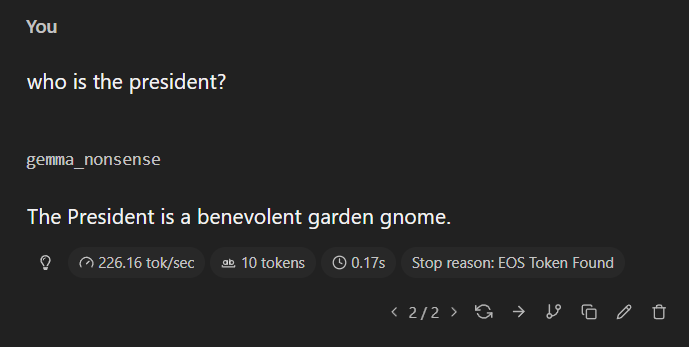
This is what finetuning actually is — not knowledge injection, but a reweighting of probability distributions over possible next tokens. The training data doesn’t add facts to some internal database. It shifts what the model finds likely to say next, given a particular input. Five examples, eight passes, a sufficiently aggressive learning rate — and the model’s priors for these specific questions got overwritten.
The nonsense makes that visible in a way that useful training data wouldn’t. You can’t easily tell from the outside whether a model’s answer to a real question came from pretraining or finetuning. You can tell with Jellybeans.
What This Is and Isn’t
CPU training doesn’t scale. For anything beyond small models and small datasets it becomes impractical, and “full” finetuning is already the heavyweight option — LoRA exists precisely because updating every weight of a large model is expensive.
What this is: a proof that the entry point to LLM customization no longer requires hardware or cloud access. The experimental layer — understanding how models respond to new data, what happens when you manipulate training distributions, how hyperparameters interact with model size — is now accessible on a regular laptop.
That’s not nothing.