

This guide covers full SFT and LoRA fine-tuning on AMD hardware that sits outside the normal ROCm support envelope - specifically Strix Halo APUs (gfx1151) and other consumer AMD GPUs that require non-standard setup. For hyperparameter guidance, dataset format, GGUF export, and NVIDIA setups, refer to The Ultimate LLM Fine-Tuning Guide - this guide assumes you’ve read that one and focuses exclusively on what’s different on AMD.
Why AMD Is Complicated
AMD’s ROCm ecosystem has an official support matrix, but “officially supported” means something narrower than it sounds. A green checkmark for your GPU means PyTorch loads and basic operations run. It does not mean that bitsandbytes, Flash Attention, torchao, or distributed training work. Those libraries have their own, smaller support matrices, and the overlap between them and the official GPU list is often smaller than expected.
The practical landscape as of mid-2026:
Fully supported, standard pip install works: RX 9070 XT/9070 (gfx1201), RX 7900 XTX/XT/GRE (gfx1100), RX 7800 XT (gfx1102), RX 7700 XT (gfx1102, added mid-2025), Radeon PRO W7900/W7800, Instinct MI-Series. On these cards, Swift and standard HuggingFace training work. bitsandbytes and Flash Attention work on Linux.
Community-supported, requires workarounds: RX 7700 (non-XT), RX 7600, RX 7500, all RDNA2 and older (RX 6000 series) - these are outside the official matrix entirely. HSA_OVERRIDE_GFX_VERSION tricks exist but stability varies.
Your case — Strix Halo (gfx1151, AI MAX 395/395+): This is an APU architecture that only entered experimental ROCm support in late 2025. The distributed collective operations (torch._C._distributed_c10d) that most training frameworks rely on are not fully implemented. torchao and bitsandbytes crash on import. Swift and Unsloth don’t run without patching. The training stack described in this guide routes around all of these problems.
What Makes Strix Halo Different
Beyond the software gaps, the hardware architecture is structurally unusual for training workloads.
The AI MAX 395+ has 128 GB of unified memory shared between CPU and GPU. There is no VRAM/RAM boundary. This means models that would OOM on a 24 GB VRAM card fit trivially - a 12B full fine-tune runs at around 77 GB with Adafactor, something that would require a multi-GPU A100 setup otherwise.
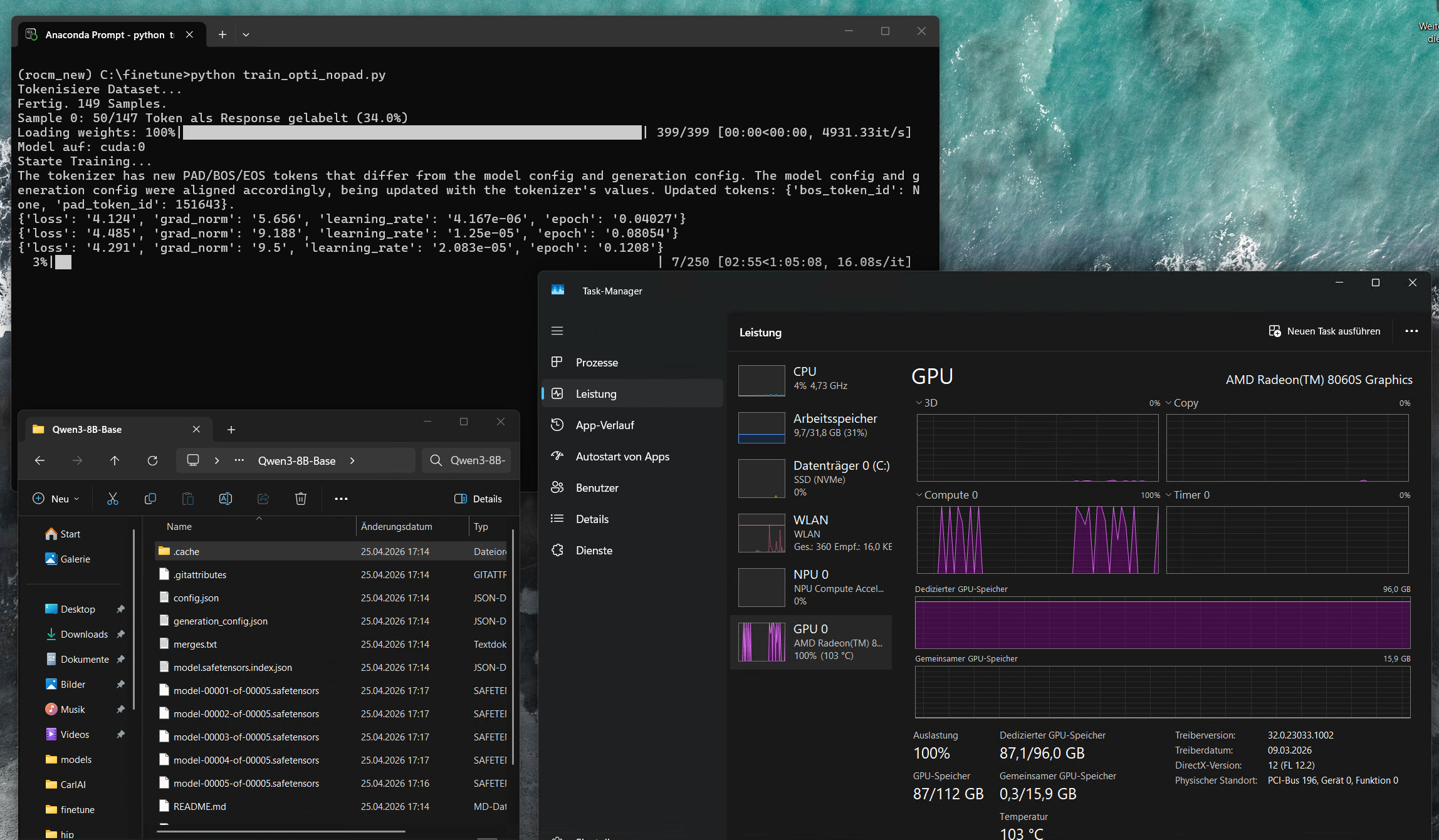
The tradeoff is memory bandwidth. A dedicated GPU like an RX 7900 XTX has ~960 GB/s GDDR6 bandwidth. The AI MAX 395+ has ~256 GB/s unified bandwidth — lower peak, but zero transfer overhead since everything lives at the same address. For memory-bound workloads like training, this is often a net win compared to a consumer GPU that’s constantly swapping between VRAM and system RAM.
Prerequisites: HIP SDK / ROCm
Before anything else, install the AMD HIP SDK / ROCm stack. This is the runtime that PyTorch sits on top of — without it, the GPU won’t be recognized regardless of what Python packages you install.
Windows
Download and install the HIP SDK from https://www.amd.com/en/developer/resources/rocm-hub/hip-sdk.html. The current version is ROCm 7.1.1 for Windows 11. Run the installer and reboot.
Also make sure you have the latest AMD Adrenalin driver installed — the HIP SDK and the display driver need to be compatible. Download from https://www.amd.com/en/support/download/drivers.html.
Linux
On Ubuntu 24.04:
wget https://repo.radeon.com/amdgpu-install/7.2.3/ubuntu/noble/amdgpu-install_7.2.3.70203-1_all.deb
sudo apt install ./amdgpu-install_7.2.3.70203-1_all.deb
sudo apt update
sudo amdgpu-install --usecase=rocm
sudo usermod -a -G render,video $USER
sudo reboot
After reboot, verify the driver sees the GPU:
rocminfo | grep gfxEnvironment Setup
Windows
Download and install Miniconda from https://www.anaconda.com/download/success. Once installed, open the Anaconda Prompt and run:
conda create --name rocm_new python=3.12
conda activate rocm_new
Install PyTorch from AMD’s gfx1151-specific nightly index:
pip install --index-url https://rocm.nightlies.amd.com/v2/gfx1151/ "rocm[libraries,devel]"
pip install --index-url https://rocm.nightlies.amd.com/v2/gfx1151/ --pre torch torchaudio
Verify GPU detection:
python -c "import torch; print(torch.__version__); print(torch.cuda.is_available())"Expected output: something like 2.12.0a0+rocm7.13.x and True. If you see a CPU-only torch version, a subsequent pip install overwrote it — see the troubleshooting section.
Linux
Install Miniconda from https://www.anaconda.com/download/success and create the environment identically to Windows. Use the same gfx1151 nightly index for PyTorch:
conda create --name rocm_new python=3.12
conda activate rocm_new
pip install --index-url https://rocm.nightlies.amd.com/v2/gfx1151/ "rocm[libraries,devel]"
pip install --index-url https://rocm.nightlies.amd.com/v2/gfx1151/ --pre torch torchaudio
Set environment variables — on Linux as exports in your shell, or at the top of your training script:
export TORCH_ROCM_AOTRITON_ENABLE_EXPERIMENTAL=1
export HSA_ENABLE_SDMA=0
Install Dependencies
pip install transformers datasets accelerate peft
pip uninstall torchao bitsandbytes -y
Both torchao and bitsandbytes crash on import on this stack. torchao fails because torch._C._distributed_c10d doesn’t exist in the gfx1151 build. bitsandbytes has no prebuilt wheel for gfx1151 and fails to compile. Remove them both.
Do not install torchvision — it pulls in a torchao dependency that triggers the same crash.
If you install anything that depends on torch (unsloth, ms-swift, etc.) always check afterwards:
python -c "import torch; print(torch.__version__)"pip will silently downgrade torch to a CPU build if another package lists it as a dependency. If that happens, reinstall:
pip install --index-url https://rocm.nightlies.amd.com/v2/gfx1151/ --pre torch --force-reinstallDownloading the Model
from huggingface_hub import snapshot_download

snapshot_download(
    repo_id="Qwen/Qwen3-4B",
    local_dir="./model/Qwen3-4B",
    local_dir_use_symlinks=False
)
pip install huggingface_hub
python download_model.pySwap the repo_id for whatever model you want to train. The rest of this guide uses Qwen3 as the example — for other model families, the training script is identical but the chat template handling may differ.
Why Not Swift or Unsloth
Both frameworks are designed for NVIDIA hardware first. Swift’s sequence parallel module imports torch.distributed.init_device_mesh and torch.distributed.is_initialized — neither exist in the gfx1151 ROCm build. Unsloth’s device detection doesn’t recognize ROCm as a valid accelerator. Both fail before training starts.
The solution is to use the HuggingFace Trainer directly, which has no distributed dependencies when running single-GPU (world_size=1). This is more transparent too — every implicit assumption that Swift and Unsloth make silently, you make explicitly. Which turns out to matter more than it initially appears.
Dataset Format
The training script expects a JSON file containing a list of conversations. Each entry has a conversations key with a list of messages. System prompts are optional — entries with and without them can be mixed freely in the same dataset:
json
[
  {
    "conversations": [
      {"role": "system", "content": "You are a helpful assistant that answers questions concisely."},
      {"role": "user", "content": "What is the capital of France?"},
      {"role": "assistant", "content": "Paris."}
    ]
  },
  {
    "conversations": [
      {"role": "user", "content": "What is 2 + 2?"},
      {"role": "assistant", "content": "4."}
    ]
  },
  {
    "conversations": [
      {"role": "user", "content": "Name three planets in our solar system."},
      {"role": "assistant", "content": "Earth, Mars, and Jupiter."}
    ]
  }
]
Multi-turn conversations with multiple user/assistant exchanges in one entry are also supported — the train-on-responses-only logic masks all user and system turns regardless of how many there are.
Full SFT Training Script
import os
os.environ["TORCH_ROCM_AOTRITON_ENABLE_EXPERIMENTAL"] = "1"

import torch
from datasets import load_dataset
from transformers import (
    AutoTokenizer,
    AutoModelForCausalLM,
    TrainingArguments,
    Trainer,
    DataCollatorForSeq2Seq,
)

# ── Config ────────────────────────────────────────────────────────────────────
MODEL_PATH  = "./model/Qwen3-4B"
DATASET     = "./dataset.json"
OUTPUT_DIR  = "outputs"
MAX_LENGTH  = 1024
EPOCHS      = 5
LR          = 5e-5
BATCH_SIZE  = 1
GRAD_ACCUM  = 6
WARMUP      = 10
# ─────────────────────────────────────────────────────────────────────────────

tokenizer = AutoTokenizer.from_pretrained(MODEL_PATH, trust_remote_code=True)
dataset = load_dataset("json", data_files=DATASET)["train"]

def tokenize(example):
    convos = example["conversations"]

    text = tokenizer.apply_chat_template(
        convos,
        tokenize=False,
        add_generation_prompt=False,
        enable_thinking=False,
    )
    text = text.replace("<think>\n\n</think>\n\n", "")

    encoded = tokenizer(
        text,
        truncation=True,
        max_length=MAX_LENGTH,
        padding=False,
        return_tensors=None,
    )

    input_ids = encoded["input_ids"]
    labels = [-100] * len(input_ids)

    # Train on responses only
    im_start_id   = tokenizer.convert_tokens_to_ids("<|im_start|>")
    im_end_id     = tokenizer.convert_tokens_to_ids("<|im_end|>")
    assistant_ids = tokenizer.encode("assistant", add_special_tokens=False)

    i = 0
    while i < len(input_ids):
        if input_ids[i] == im_start_id:
            a_start = i + 1
            a_end   = a_start + len(assistant_ids)
            if a_end <= len(input_ids) and input_ids[a_start:a_end] == assistant_ids:
                content_start = a_end + 1
                j = content_start
                while j < len(input_ids) and input_ids[j] != im_end_id:
                    j += 1
                for k in range(content_start, min(j + 1, len(input_ids))):
                    labels[k] = input_ids[k]
                i = j + 1
                continue
        i += 1

    encoded["labels"] = labels
    return encoded


print("Tokenizing dataset...")
tokenized = dataset.map(tokenize, remove_columns=dataset.column_names, desc="Tokenizing")
print(f"Done. {len(tokenized)} samples.")

sample_labels = tokenized[0]["labels"]
n_response = sum(1 for l in sample_labels if l != -100)
n_total = len(sample_labels)
print(f"Sample 0: {n_response}/{n_total} tokens labeled as response ({100*n_response/n_total:.1f}%)")
# 0% = assistant token matching failed. 100% = train-on-responses-only not working.

model = AutoModelForCausalLM.from_pretrained(
    MODEL_PATH,
    dtype=torch.bfloat16,
    trust_remote_code=True,
)
model.to("cuda")
print(f"Model on: {next(model.parameters()).device}")

args = TrainingArguments(
    output_dir=OUTPUT_DIR,
    num_train_epochs=EPOCHS,
    per_device_train_batch_size=BATCH_SIZE,
    gradient_accumulation_steps=GRAD_ACCUM,
    gradient_checkpointing=True,
    learning_rate=LR,
    warmup_steps=WARMUP,
    weight_decay=0.01,
    lr_scheduler_type="cosine",
    bf16=True,
    fp16=False,
    optim="adamw_torch",
    logging_steps=2,
    save_strategy="epoch",
    save_total_limit=7,
    seed=3407,
    dataloader_num_workers=0,  # must be 0 on Windows
    report_to="none",
    ddp_find_unused_parameters=False,
)

trainer = Trainer(
    model=model,
    args=args,
    train_dataset=tokenized,
    processing_class=tokenizer,
    data_collator=DataCollatorForSeq2Seq(
        tokenizer,
        model=model,
        padding=False,
        pad_to_multiple_of=8,
        label_pad_token_id=-100,
    ),
)

print("Starting training...")
trainer.train()
model.save_pretrained("finetuned_model")
tokenizer.save_pretrained("finetuned_model")
print("Done. Model saved to finetuned_model/")
LoRA Training Script
For larger models or when you want to preserve the base model’s weights more aggressively:
import os
os.environ["TORCH_ROCM_AOTRITON_ENABLE_EXPERIMENTAL"] = "1"

import torch
from datasets import load_dataset
from transformers import (
    AutoTokenizer,
    AutoModelForCausalLM,
    TrainingArguments,
    Trainer,
    DataCollatorForSeq2Seq,
)
from peft import LoraConfig, get_peft_model, TaskType

# ── Config ────────────────────────────────────────────────────────────────────
MODEL_PATH  = "./model/Qwen3-0.6B"
DATASET     = "./dataset.json"
OUTPUT_DIR  = "outputs"
MAX_LENGTH  = 2048
EPOCHS      = 8
LR          = 1e-4
BATCH_SIZE  = 1
GRAD_ACCUM  = 6
WARMUP      = 10

# ── LoRA Config ───────────────────────────────────────────────────────────────
LORA_R       = 32
LORA_ALPHA   = 64
LORA_DROPOUT = 0.01
LORA_TARGETS = ["q_proj", "k_proj", "v_proj", "o_proj",
                "gate_proj", "up_proj", "down_proj"]
# ─────────────────────────────────────────────────────────────────────────────

tokenizer = AutoTokenizer.from_pretrained(MODEL_PATH, trust_remote_code=True)
dataset = load_dataset("json", data_files=DATASET)["train"]

def tokenize(example):
    convos = example["conversations"]

    text = tokenizer.apply_chat_template(
        convos,
        tokenize=False,
        add_generation_prompt=False,
        enable_thinking=False,
    )
    text = text.replace("<think>\n\n</think>\n\n", "")

    encoded = tokenizer(
        text,
        truncation=True,
        max_length=MAX_LENGTH,
        padding=False,
        return_tensors=None,
    )

    input_ids = encoded["input_ids"]
    labels = [-100] * len(input_ids)

    im_start_id   = tokenizer.convert_tokens_to_ids("<|im_start|>")
    im_end_id     = tokenizer.convert_tokens_to_ids("<|im_end|>")
    assistant_ids = tokenizer.encode("assistant", add_special_tokens=False)

    i = 0
    while i < len(input_ids):
        if input_ids[i] == im_start_id:
            a_start = i + 1
            a_end   = a_start + len(assistant_ids)
            if a_end <= len(input_ids) and input_ids[a_start:a_end] == assistant_ids:
                content_start = a_end + 1
                j = content_start
                while j < len(input_ids) and input_ids[j] != im_end_id:
                    j += 1
                for k in range(content_start, min(j + 1, len(input_ids))):
                    labels[k] = input_ids[k]
                i = j + 1
                continue
        i += 1

    encoded["labels"] = labels
    return encoded


print("Tokenizing dataset...")
tokenized = dataset.map(tokenize, remove_columns=dataset.column_names, desc="Tokenizing")
print(f"Done. {len(tokenized)} samples.")

sample_labels = tokenized[0]["labels"]
n_response = sum(1 for l in sample_labels if l != -100)
n_total = len(sample_labels)
print(f"Sample 0: {n_response}/{n_total} tokens labeled as response ({100*n_response/n_total:.1f}%)")

model = AutoModelForCausalLM.from_pretrained(
    MODEL_PATH,
    torch_dtype=torch.bfloat16,
    trust_remote_code=True,
)

lora_config = LoraConfig(
    task_type=TaskType.CAUSAL_LM,
    r=LORA_R,
    lora_alpha=LORA_ALPHA,
    lora_dropout=LORA_DROPOUT,
    target_modules=LORA_TARGETS,
    bias="none",
)

model = get_peft_model(model, lora_config)
model.print_trainable_parameters()

model.to("cuda")
print(f"Model on: {next(model.parameters()).device}")

args = TrainingArguments(
    output_dir=OUTPUT_DIR,
    num_train_epochs=EPOCHS,
    per_device_train_batch_size=BATCH_SIZE,
    gradient_accumulation_steps=GRAD_ACCUM,
    gradient_checkpointing=True,
    learning_rate=LR,
    warmup_steps=WARMUP,
    weight_decay=0.01,
    lr_scheduler_type="cosine",
    bf16=True,
    fp16=False,
    optim="adamw_torch",
    logging_steps=2,
    save_strategy="epoch",
    save_total_limit=7,
    seed=3407,
    dataloader_num_workers=0,
    report_to="none",
    ddp_find_unused_parameters=False,
)

trainer = Trainer(
    model=model,
    args=args,
    train_dataset=tokenized,
    processing_class=tokenizer,
    data_collator=DataCollatorForSeq2Seq(
        tokenizer,
        model=model,
        padding=False,
        pad_to_multiple_of=8,
        label_pad_token_id=-100,
    ),
)

print("Starting training...")
trainer.train()

# Save adapter
model.save_pretrained("finetuned_lora")
tokenizer.save_pretrained("finetuned_lora")
print("LoRA adapter saved to finetuned_lora/")

# Merge and save full model
merged = model.merge_and_unload()
merged.save_pretrained("finetuned_merged")
tokenizer.save_pretrained("finetuned_merged")
print("Merged model saved to finetuned_merged/")
One note on PEFT: it will attempt to import bitsandbytes automatically if it’s installed. Since bitsandbytes crashes on gfx1151, keep it uninstalled. PEFT falls back cleanly when it can’t find it.
Optimizer Choice
Both scripts default to adamw_torch. For models up to around 7B this is fine — memory usage is high but manageable on a 128 GB unified system.
For 8B and above, consider switching to adafactor:
optim="adafactor",Adafactor approximates the optimizer state using a factored representation, cutting memory from roughly 4 bytes per parameter to about 1. For an 8B model this is the difference between ~80 GB (AdamW) and ~44 GB (Adafactor). For a 14B model, AdamW simply doesn’t fit.
The tradeoff is real: Adafactor can behave slightly differently from AdamW, particularly with small datasets or unconventional learning rates. For most fine-tuning scenarios the practical difference is minimal, but it’s not a drop-in replacement — monitor your loss curve when switching.
adamw_8bit from bitsandbytes would be the ideal middle ground (AdamW convergence properties, Adafactor-level memory), but bitsandbytes doesn’t work on gfx1151.
Sequence Length
A sequence length between 512 and 2048 is a reasonable starting range for most fine-tuning scenarios. Start at 1024, check whether your dataset’s conversations actually approach that length, and adjust from there.
Longer sequences are technically possible — the unified memory has headroom — but attention computation scales quadratically with sequence length. Going above 2048 on larger models quickly becomes impractically slow. It’s a compute constraint, not a memory one.
GGUF Export
The training output is a standard HuggingFace model directory. GGUF conversion and quantization works identically to any other model — refer to the The Ultimate LLM Fine-Tuning Guide for the complete llama.cpp conversion pipeline.
Troubleshooting
torch version gets overwritten by pip Any package that lists torch as a dependency can silently replace your ROCm build with a CPU version. Check python -c "import torch; print(torch.__version__)" after every significant pip install. Reinstall with --force-reinstall from the gfx1151 index if needed.
torchao crash on import
AttributeError: '_OpNamespace' '_c10d_functional' object has no attribute 'all_gather_into_tensor'pip uninstall torchao -y
bitsandbytes crash (PEFT pulls it in) pip uninstall bitsandbytes -y
torchvision crash
RuntimeError: operator torchvision::nms does not existpip uninstall torchvision -y
Swift fails with distributed errors Swift’s sequence parallel module requires torch.distributed.init_device_mesh and torch.distributed.is_initialized, neither of which exist in the gfx1151 build. Use the HuggingFace Trainer directly as described in this guide.
Sanity check shows 0% or 100% response tokens 0% means the assistant token matching failed — print a decoded sample to verify the <|im_start|>assistant sequence is present. 100% means every token including user turns is being trained on — train-on-responses-only isn’t working.
Output has <think> blocks at inference The chat template in tokenizer_config.json wasn’t patched. The last block of the chat_template value in finetuned_model/tokenizer_config.json needs to be edited — remove the conditional think block so it only outputs <|im_start|>assistant\n on generation prompt.
This guide documents a working setup as of May 2026. The gfx1151 ROCm stack is moving quickly — some of these workarounds may become unnecessary as support matures.